Google Play memory thresholds: a QA plan before February 2027
What Play will measure, which numbers apply by RAM tier, and the real-device tests I would run before enforcement starts.
What Play will check from February 2027
On August 26, 2026, Google announced that from February 2027 apps and games on Google Play must meet "bad behavior" thresholds for memory usage (anonymous RSS plus swap), bitmap memory and DEX code optimization. Google says apps and games that miss them may see reduced visibility and publishing capabilities. It has not quantified that effect and plans more details later in 2026.
Play evaluates the 90th percentile (P90) over the last 28 days, using samples from opted-in phones and tablets. It uses every app version that reports data, which means Android 13 and later for these metrics. A P90 comes from field sessions, so one lab run cannot reproduce it. I would treat local tests as an early warning and Android vitals as the verdict.
References: Play Console technical quality requirements
References: Android Developers Blog, August 26, 2026
Read the table by RAM tier and process state
Google publishes one table for apps and another for games, based on the category set in Play Console. Each row is a RAM tier defined by total memory, which can be lower than the number on the box. Check what a device reports before you pick its row.
In the 4 GB tier, the P90 ceiling for a game is 2.25 GB in the foreground and 2.0 GB in the background. For an app it is 2 GB and 1 GB. Background and user-perceived services, such as foreground services, share one value in every listed tier.
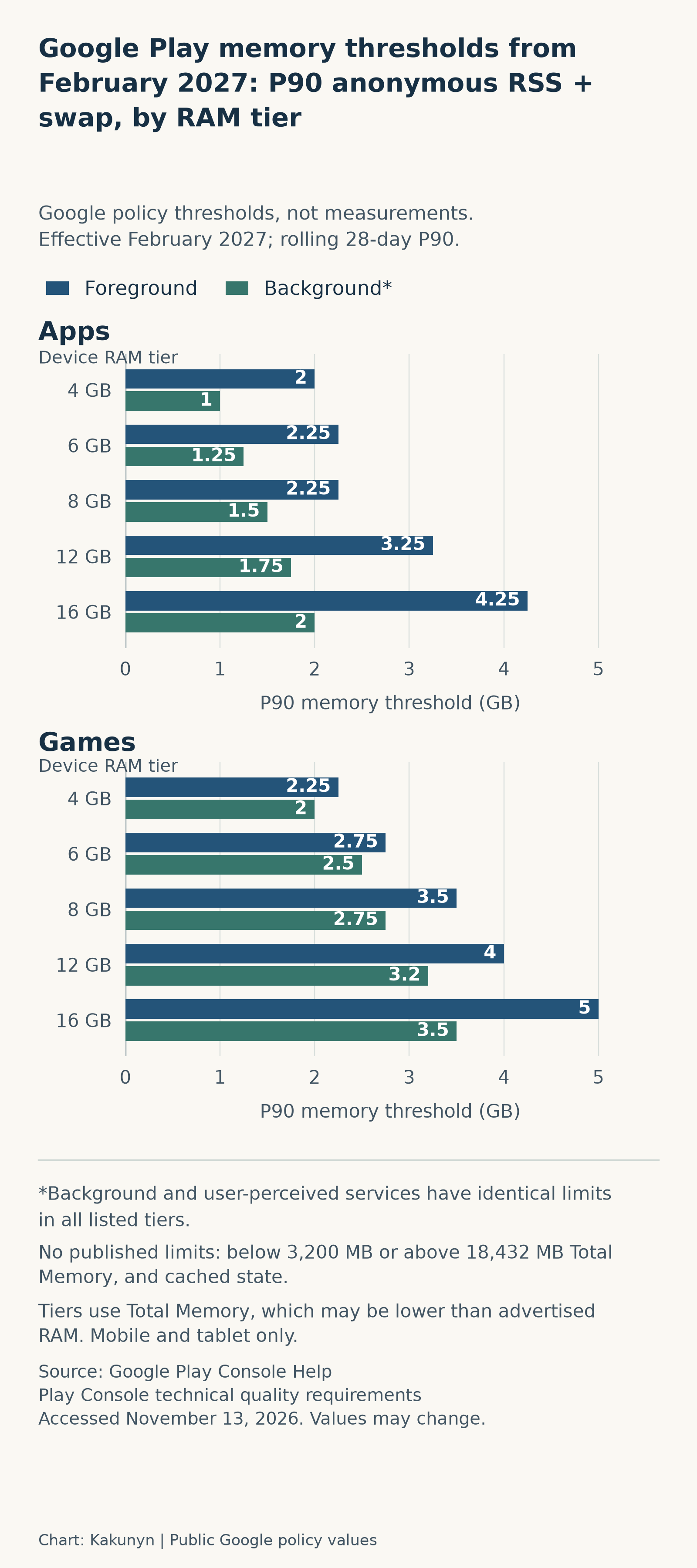
No memory threshold is published for devices below 4 GB, above 16 GB, or for the cached state. Bitmaps have separate figures outside the foreground: above 200 MB for background and user-perceived services, and above 400 MB for cached. The DEX rule asks for at least 25% obfuscation, optimization and shrinking, only for apps with more than 10 MB of DEX code and games with more than 50 MB. These are Google's policy values and may change, so reread the page before you plan.
References: Reduced memory usage tables
References: Android vitals: memory usage
Tests I would run on real devices
This plan is my own suggestion.
- Pick at least one device per tier you support. Google's games guidance notes that many players use 4 GB or 6 GB phones, so I would start there.
- Run your longest realistic session and capture adb shell dumpsys meminfo <package> at intervals. Google maps Private Dirty to anonymous RSS and Swap Dirty to zRAM. Add them for a rough reading and compare with that tier's row, leaving margin, since one device cannot stand in for a P90.
- Move through the states. Background the app, start a foreground service if you have one, then return after several minutes. Memory, bitmaps especially, should fall after onTrimMemory. Take a heap dump in each state.
- Repeat the loop and watch for growth. Google reads a field P99-to-P50 ratio of 3.5 or higher as a likely leak in long sessions, while noting that some workflows raise it without a leak.
- On Android 17, record what happens near the Memory Limiter. The system applies its own limits and can throttle or terminate an app. Use adb shell am memory-limiter status during debugging to confirm the limits on the device.
- Test the optimized release build. Check the minification settings in your build pipeline and the optimization, shrinking and obfuscation percentages in Play Console. Rerun regression on that build.
References: Diagnose excessive memory usage
References: Android memory limiter
References: Broader memory limits, August 19, 2026
References: Memory for games
References: Android vitals: memory usage
References: Android vitals: DEX code optimization
Where lab tests stop
A lab run finds leaks and regressions on devices you know. Android vitals shows what real sessions do, so compare it by RAM tier, process state, Android version and release. A separate zero-tap sign-in requirement starts in April 2027 and excludes games for now.
Kakunyn's mobile game performance testing covers memory alongside FPS, battery, network behavior, heat and crashes. See our mobile QA services or talk to us about devices and journeys before February. For the wider routine, read mobile game performance testing.
About the author
Rofli Sanches is a developer with more than 18 years of experience and a co-founder of Kakunyn.
Have a product question or need a second opinion?
Talk with the Kakunyn team about your software and quality needs.